This article will help you use Microsoft 365 without Copilot addon on your devices. Our other article previously helped you turn off Copilot in the Software, but this article will help you remove it from your 365 plan.
Table of Contents
Co-pilot History with Office 365
Microsoft integrated Copilot into its 365 suite as part of a push to enhance productivity through AI. They announced Copilot on March 16, 2023, designing it to work natively within Office applications like Word, Excel, PowerPoint, Outlook, and Teams, enabling tasks such as drafting documents, summarising emails, creating presentations, and analysing data. As a result, they raised the price of Microsoft 365 subscription by $3 a month.

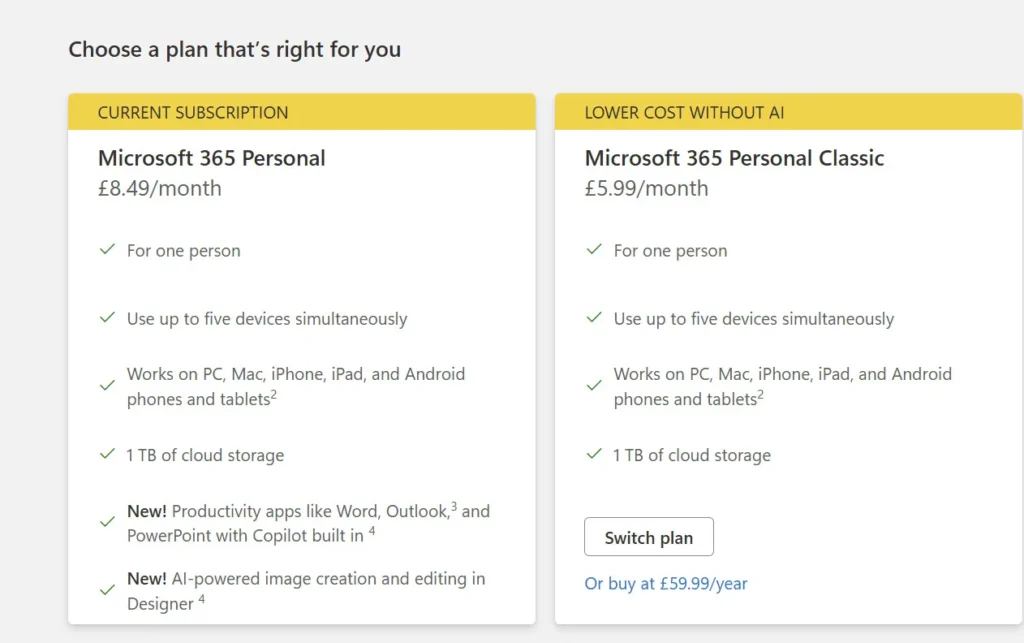
Switch to Personal Classic to use Microsoft 365 without Copilot
To obtain a reduced-rate Microsoft 365 subscription without Copilot, follow these steps:
- Log In to Your Microsoft Account: First, visit the Microsoft account services page and log in with your credentials. The link for it is here.
- Manage Subscription: In the next step, look for your Microsoft 365 subscription and select the Manage option. Then, you should find an option labelled Cancel subscription.
- Select the Classic Plan: After cancelling, you may be prompted to switch to one of the Classic plans available. These include:
- Microsoft 365 Personal Classic (approximately $69.99 per year)
- Microsoft 365 Family Classic (roughly $99.99 per year)
- Confirm Changes: Concurrently, Follow the on-screen instructions to confirm your downgrade to the Classic plan. Be aware that the new subscription will take effect upon your next billing cycle
To summarise, this article will help you use Microsoft 365 without Copilot functionality. In addition, since it is free, you should be able to use the Web Copilot without issues. It would not affect your action of reverting to classic subscription.