If your organization uses Microsoft 365 for work, you may be eligible for an SLA Credit i.e. Microsoft 365 Outage compensation. The outage affected several services, including Outlook, Exchange Online, Teams, OneDrive, and Copilot, leaving many businesses unable to carry out their regular work.
However, Microsoft does not automatically issue compensation to affected customers. You need to submit an SLA (Service Level Agreement) credit request through the Microsoft 365 admin center and ask the company to review your eligibility. Here is how you can submit a claim and what you should know before requesting compensation.
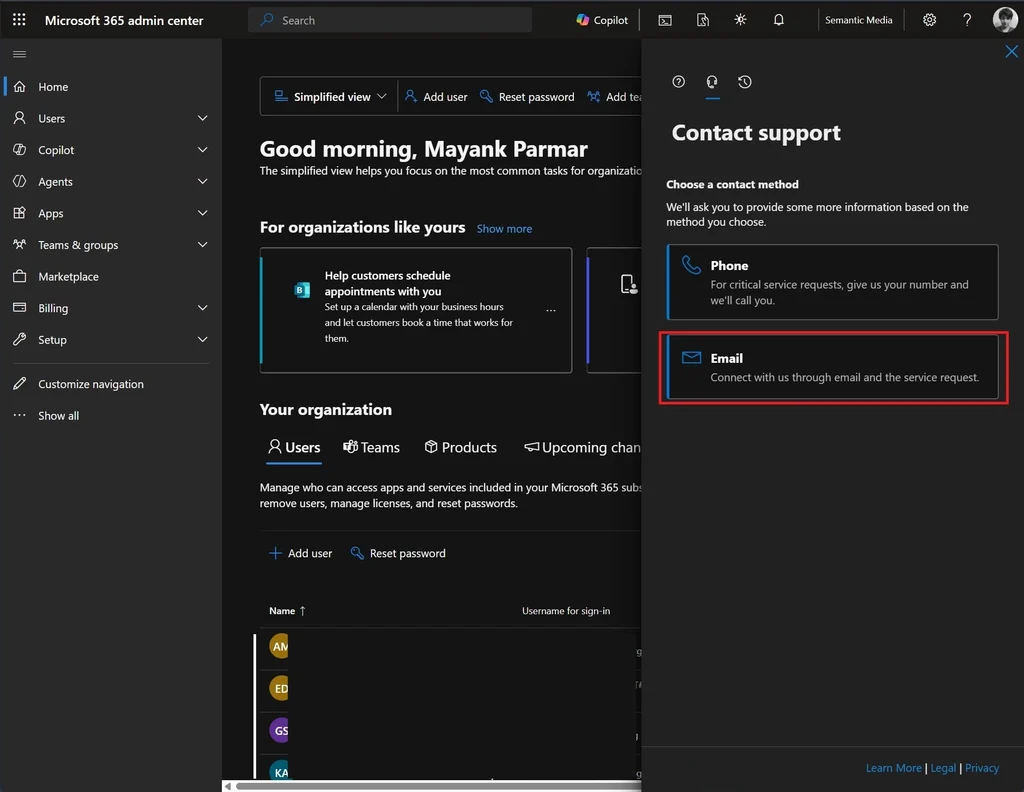
Table of Contents
What is the Microsoft 365 outage?
On November 12, 2026, Microsoft 365 experienced a major service disruption affecting users across multiple regions. Several services became unavailable or responded slowly, including Outlook, Exchange Online, Teams, Copilot, OneDrive, SharePoint Online, and Microsoft Defender. Microsoft acknowledged the incident under reference ID MO1550821. If your organization was affected, you may be eligible for an SLA service credit. Microsoft provides these credits when a service fails to meet its guaranteed monthly availability, for selected users.
How to get SLA Credit for the Microsoft 365 outage?
If you purchased Microsoft 365 directly from Microsoft, you can submit an SLA service credit request through the Microsoft 365 admin center. See these steps below:
- Open the Microsoft 365 admin center.
- Click Help & support in the bottom-right corner.
- If the Support Assistant opens, turn it off to access the search box.
- Search for Request an SLA service credit for a Microsoft 365 outage.
- Click Contact support and select Email.
- In the request title, enter SLA service credit request – MO1550821.
- Explain which Microsoft 365 services were affected, how many users experienced problems, and how long the disruption lasted for your organization.
- Attach relevant screenshots, error messages, or other evidence and submit the request by selecting Contact me.
Microsoft will review your request and determine whether your organization qualifies for a service credit. Additionally, If you use Exchange Online, you can also mention the related incident ID EX1550543 in your request.
Essential things to know before requesting Microsoft 365 Outage compensation
There are a few important things to understand before submitting your claim.
1. Compensation is not based only on the duration of the outage
A several-hour Microsoft 365 outage doesn’t automatically qualify your organization for a 50% service credit. Microsoft calculates availability in user-minutes, accounting for both outage duration and users affected. An outage affecting everyone has a different SLA impact than one affecting a small group.
2. Microsoft offers different service credit levels
According to the November 2026 version of Microsoft’s Exchange Online availability terms, the service credit levels are:
| Monthly Exchange Online uptime | Service credit |
|---|---|
| Below 99.9% | 25% |
| Below 99% | 50% |
| Below 95% | 100% |
These percentages apply to eligible service fees under the agreement. They do not mean that Microsoft will reduce your entire Microsoft 365 subscription bill by the same percentage.
3. Personal Microsoft 365 accounts are not eligible under these business SLA terms
These service credits apply to eligible business subscriptions covered by Microsoft’s SLA. They do not automatically apply to personal Outlook.com, Microsoft 365 Personal, or Microsoft 365 Family accounts.
4. Customers purchasing through a reseller must contact their provider
If you purchased Microsoft 365 through a Cloud Solution Provider (CSP) or another reseller, you should contact that provider instead of submitting the request directly to Microsoft. They can help you submit the SLA credit claim.
5. Do not miss the claim deadline
Microsoft requires SLA credit requests for services other than Azure to be submitted within one month after the end of the billing month in which the incident occurred. Since the outage happened in November 2026, make sure you submit your request within the applicable deadline.
You can read more in this support document.
Final thoughts
If your organization relies on Microsoft 365 for daily operations, the November 12 outage may make you eligible for an SLA service credit. However, compensation isn’t automatic, and experiencing the outage alone doesn’t guarantee a refund.
Submit a request through the Microsoft 365 admin center, provide the relevant incident ID, and include details about the users and services affected.