Tech support scams are a type of fraud activity, often initiated through a phone call or a fake pop-up that appears on your computer automatically, where a scammer offers to fix a non-existent problem in exchange for some charges. Over the last decade, it has become a multi-million-dollar industry. While it has been on a decline, people still get caught in the trap of those scammers.
What the tech support scam claims
Tech support scammers usually phone/email you and tell there is a problem with your computer. This includes sending viruses over the Internet, not functioning correctly as intended, etc. To prove it, they open the Event Viewer and show some error messages, which are present on every functioning computer. Another variant is you may get an unexpected popup in your browser like this:
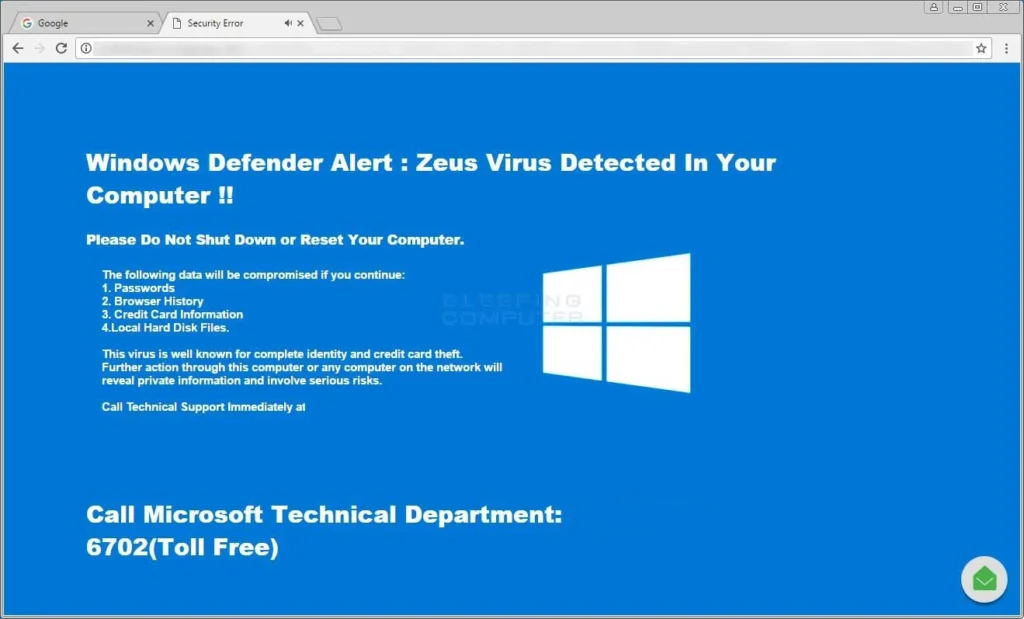
Image credits: BleepingComputer.comThe popup may arise from a mistyped URL or you may have adware on your device which came with a product you installed.
What Tech support scammers ask
Tech Support scammers tell you that they can fix the problem for you and ask for some charge. Additionally, they may offer a subscription plan, install malware, steal information, etc.
How to spot a Tech support scam
An unsolicited phone call or email is the first sign of a Tech support scam. Unless you have made prior arrangements, Microsoft/any other IT company will not call you to fix problems. Secondly, you can see the number. Every company lists its support numbers on its website. Confirm with them.
If you get calls
If you get calls and have interacted at least once, you should report the scam to Microsoft. Also, see these additional links:
Report a Scam
https://www.microsoft.com/en-in/concern/scam?rtc=1
Additional references:
Is that call from Microsoft a scam?
Protect yourself from tech support scams
https://support.microsoft.com/en-us/help/4013405/windows-protect-from-tech-support-scams
Avoid Tech support scams
https://www.ftc.gov/tips-advice/business-center/small-businesses/cybersecurity/tech-support-scams
Type of Tech support scams
https://www.consumer.ftc.gov/articles/how-spot-avoid-and-report-tech-support-scams
Tech support scammers are getting smarter
https://komonews.com/news/consumer/tech-support-scammers-are-getting-smarter
If you have given remote access to tech support scammers
If you have allowed someone to remote access your computer, your information may be compromised. You should assume everything on your computer was compromised, including Credit card, financial information, passwords, etc. Change your passwords immediately and block the cards.
We recommend a clean installation of Windows, as you are unsure of the previous configuration. You may first try to see these additional information links and then decide if a clean install is necessary.
Answers to the common security questions
If you got Tech support scam pop-ups, follow this guide and reset your browsers
http://malwaretips.com/blogs/remove-tech-support-scam-popups/
Run Super antispyware tool
http://www.superantispyware.com/
For a clean install, you can use the Tool or follow the guide below:
Microsoft releases a tool to clean Install Windows 10 easily
Clean Install Windows 10 – Microsoft Community