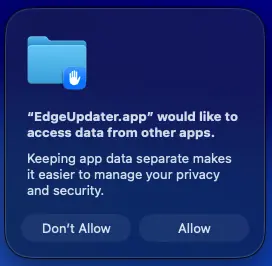
If you have a Mac and run Microsoft Edge on an Intune-managed device, you may see “EdgeUpdater would like to access data” Pop-ups.
Microsoft Edge is a popular Web Browser available on Windows, macOS, and even Linux. This article discusses a known issue, where Microsoft Edge on macOS keeps getting a repeated EdgeUpdater macOS Popup which is asking to access data.
Table of Contents
What is Microsoft Edge EdgeUpdater
Microsoft Edge EdgeUpdater is a background service that helps keep the Edge browser up to date with the latest features, security patches, and performance improvements. It runs silently in the system and checks for new updates, then installs them automatically so you don’t have to worry about manual downloads. On Windows, it works closely with Microsoft Update, while on macOS it may show permission prompts when accessing system resources. EdgeUpdater is safe and essential for smooth browsing, but if you see frequent pop‑ups, it usually means the updater is requesting access to complete its job.
How to get rid of EdgeUpdater MacOS Popup
If you are running MacOS on an Intunue or MDM Managed Device, a new known issue would trigger a popup which says the following:
“EdgeUpdater.app” would like to access data from other apps.
Keeping app data separate makes
it easier to manage your privacy
and security.
Many Mac users are reporting a strange issue where EdgeUpdater keeps asking to access data from other apps. The popup appears repeatedly, even if you press “Allow” or “Don’t Allow,” and it comes back every few minutes. People have noticed this happening after recent updates, especially on systems managed with Intune or corporate MDM, though some users without MDM also see it. Restarting Edge or the Mac doesn’t fix the problem, and the constant prompts are frustrating. Some have tried force‑quitting EdgeUpdater in Activity Monitor, but results vary. Overall, the community feels this is a bug introduced in the latest Edge update and are waiting for Microsoft to release a proper fix.
Partial fix if you are an Intune Admin
If you are an Intune admin, you can temporarily suppress these messages by deploying a PPC config to suppress these messages.
1.	com.microsoft.edgemac
2.	com.microsoft.edgeupdater
3.	com.microsoft.edgeupdate
Right now, Microsoft has neither acknowledged the issue nor issued a proper fix for this EdgeUpdater error.