Control Windows updates using these simple steps in the article
Sometimes Windows starts updating when you least expect it. It can slow down your PC, use up your internet, or restart your system when you are busy. If you want to stop Windows Update in Windows, there are a few simple settings that can help you control it better.
In older versions of Windows, it was easier to decide when updates should be downloaded and installed. But in Windows 10 and Windows 11, updates happen more automatically because Microsoft wants to keep devices safe and working well.
That sounds good in theory, but in real life, it can be annoying. An update may start at the wrong time, restart your computer, or cause problems with drivers or apps.
Table of contents
How to Stop Windows Update in Windows 10 and 11: A variety of methods
There is a wide variety of methods available for controlling Windows updates, particularly in Windows 11.
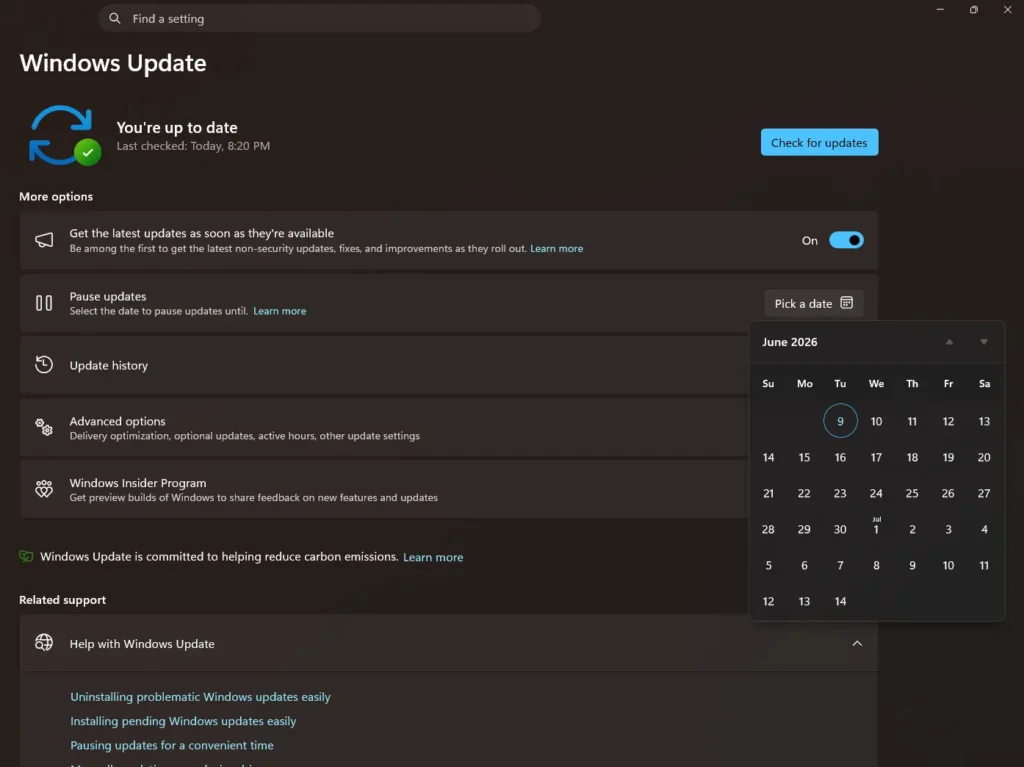
Method 1: Pause Windows updates indefinitely using the ” Pick a date” option
Windows K2 efforts have added an option to pause updates using a Calendar flyout. Earlier, the option was limited to 30 days only. You can keep increasing the date as you want.
Method 2: Set Your Network Connection as Metered
A metered connection is helpful if you have limited internet data or if you simply want fewer things downloading in the background. When you turn it on, Windows treats your connection more carefully and may avoid downloading some updates automatically.
This is one of the safest and easiest built-in ways to help stop Windows Update in Windows without changing advanced settings. It will not block every update forever, but it can give you more control and fewer surprises.
Simple Steps to Set a Wi-Fi Connection as Metered
- Open Settings.
- Go to Network & internet > Wi-Fi.
- Select the Wi-Fi network you are currently connected to.
- Turn on Metered connection.
Can You Stop Windows Update Completely?
Not fully in most cases. Windows is built to keep getting important security updates. Still, if your main goal is to stop Windows Update in Windows as much as possible, a metered connection and pause updates indefinitely are some simple methods that can help reduce automatic downloads and give you better control.
Final Thoughts
If you are tired of updates showing up at the wrong time, this method is worth trying. It is simple, safe, and does not require any advanced technical changes. While it may not stop every update forever, it can make Windows feel a lot less pushy.